

This guide is written by the SelfyzAI team. As of November 2, 2026, we verified Pika's official product, pricing, public interface, and a newly created Free account, then compared those observations with several attributed Reddit user reports. In short, Pika offers an approachable creative workspace, but buyers should judge it by credits, iteration needs, and workflow fit rather than by the number of models alone.
Prefer one workspace for several video workflows?
SelfyzAI separates text, image, reference, motion, extension, and enhancement tasks so you can choose the path that matches your source material.
What Pika Is
Pika is an official AI creative platform for video, images, and audio. Its current site combines a Video Studio with task-focused apps such as Extend Video, Color Grade, Soundtrack, Image Studio, and Character Studio, while its model picker includes Pika models and third-party options.
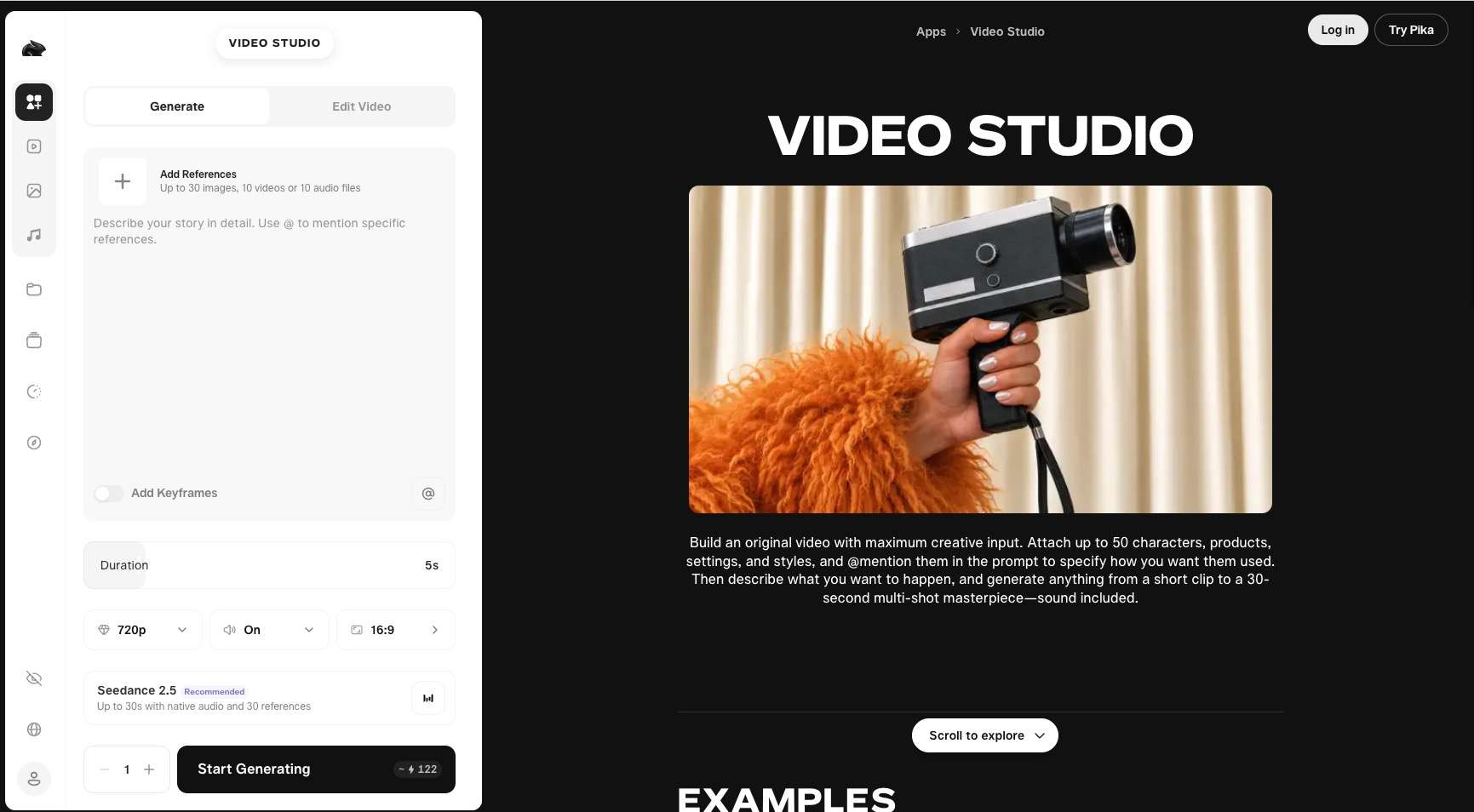
The official Pika AI video generator interface is compact enough for a first-time user, but model selection can change the available inputs and cost.
Video Studio Controls
On November 2, 2026, the public Video Studio recommended Wan 3.0 by default. The visible setup was a five-second, 720p, 16:9 generation with audio on and an estimated cost of 33 credits. These controls make the first decision concrete: model, duration, resolution, aspect ratio, sound, and number of outputs.
Selecting Pika 2.5 changed the workflow. The interface required one source image, offered five- or ten-second output, switched audio off, and showed an estimated 20-credit cost for the displayed setup. That difference matters because Pika is not one fixed generator; each model can expose a different input path.
Models and Task-Focused Apps
The model picker included Pika 2.5, Pika H3 Flex, Wan 3.0, Seedance 2.5, MiniMax H3, Kling 4.0, and Veo 3.1 on the verification date. The surrounding apps extend the workspace beyond generation, covering tasks such as soundtrack creation, extension, color grading, and character work.
Creators who prefer a purpose-built path can compare this with our dedicated image to video workflow. The useful distinction is not simply model count; it is whether the interface makes the intended task clear before credits are spent.
Free Account Experience
The public interface lets visitors inspect settings, but generation requires an account. We created a Free account through Google sign-in and saw a zero-credit balance. Because no credits were available, we did not submit a render and do not present generation quality, speed, or export behavior as our own result.
What Pika Reviews and User Reports Say
In order to know more perspectives to Pika and ensure our reviews are as fair as possible, we checked community discussions add useful workflow context about Pika by real users.
Expressive Short Clips
One Reddit author describing a month of paid advertising use called Pika's clips highly expressive when the model cooperated. Another multi-model test praised its cinematic camera and environment results, while a roundup framed Pika 2.5 as a budget-oriented option for social content and prototyping. These reports suggest a short-form strength, not uniform quality across models and prompts.
Repeatability and Rerolls
The most repeated concern is repeatability. One paid user reported different outputs from the same prompt and image; another described weaker adherence but said the same looseness could suit transformations. If one acceptable shot requires several attempts, both credits and review time become part of the budget.
Longer Production Workflows
A four-month commercial-use retrospective praised short-clip motion and inpainting but reported drift in complex extensions. Because the low-engagement post promoted another platform, treat its exact numbers as one case. The practical lesson is to test a representative multi-shot workflow before client adoption.
Pika Pricing and Credits
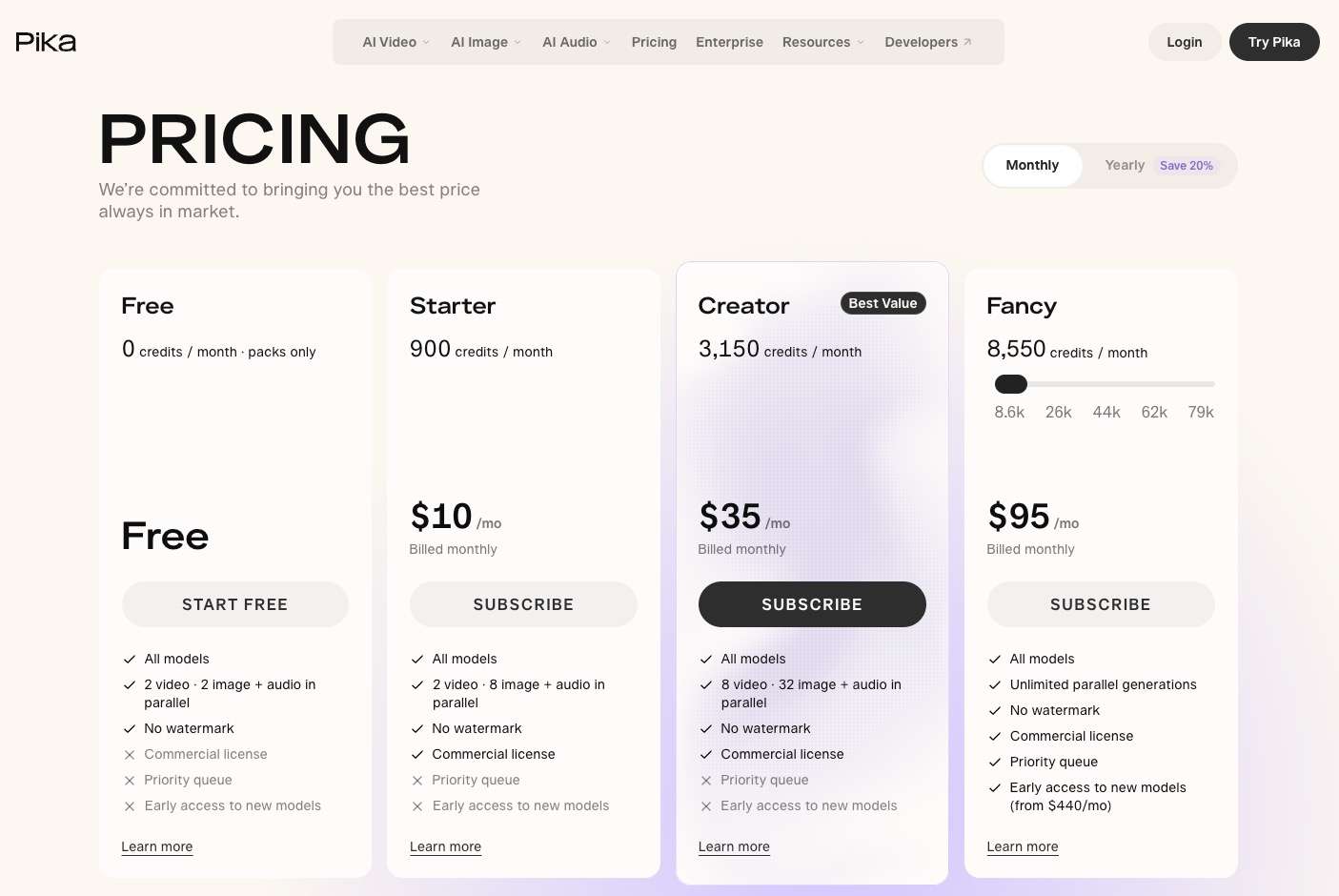
Pika's 2026 plans combine monthly subscriptions with credits, while the Free plan relies on purchased packs.
Plans Verified in November 2026
The official pricing page displayed Free at $0 with zero monthly credits, Starter at $10 with 900 credits, Creator at $35 with 3,150 credits, and Fancy starting at $95 with 8,550 credits. Free listed access to all models, two parallel video generations, and no watermark, but it did not include a commercial license, priority queue, or early access.
Priority queue access began with Fancy. Early access appeared only on a much higher Fancy tier starting at $440 per month. Prices and plan rules can change, so check the live Pika page before purchasing.
Cost per Usable Clip
The public estimates show why plan price alone is not enough. The displayed Wan 3.0 setup cost about 33 credits, while the Pika 2.5 image-led setup showed about 20 credits. Neither number predicts the real project cost unless you also know how many attempts, extensions, or alternate shots you expect to make.
Our platform also meters third-party models, with credit use varying by model, duration, and resolution. Compare the current pricing with the exact model and shot length you intend to use, not with an assumed flat cost.
Real Limitations
Pika's main limitations are visible before generation and should be part of the buying decision.
Free Means Packs, Not Monthly Credits
The Free plan listed zero monthly credits on November 2, 2026. A new zero-credit account cannot run the displayed video job without obtaining credits.
Free Does Not Include a Commercial License
Pika's pricing table did not include a commercial license on Free. Creators planning paid client work should verify the current plan terms before assuming that watermark-free output also grants the license they need.
Queue Priority Is a Higher-Tier Benefit
Priority queue access started with Fancy, and one paid Reddit user reported a nine-hour High Demand state. That wait is a single case rather than a normal-time benchmark, but it shows why deadline-driven teams should test queue behavior during their own working hours.
Model Breadth Adds Decision Work
Inputs, duration, audio, and credit estimates can change by model, so teams need a repeatable selection and review process.
How to Use Pika
Use Pika as a shot-generation workflow rather than expecting one prompt to finish a full edit.
-
Open Video Studio for a new shot or select a focused app such as Extend Video or Soundtrack when the task begins with an existing asset.
Done whenThe selected app matches the next production step.
-
Open the model picker and check whether the model expects text, an image, or another reference. Confirm the visible duration, audio, aspect ratio, and credit estimate.
Done whenThe required input and displayed cost are clear.
-
Describe one subject, one action, camera movement, lighting, and any sound cue. Avoid combining several scenes in the first request.
Done whenThe prompt describes a single reviewable shot.
-
Submit a single variation first. Save the prompt, model, settings, displayed credit cost, and result so the next attempt changes only one variable.
Done whenThe first result can be compared with a controlled revision.
-
Check subject stability, motion, prompt adherence, unwanted text, and audio. Extend only a clip that already has a clean final frame and usable motion.
Done whenThe selected clip is suitable for editing or extension.
If the project starts with text rather than an image, use our separate text to video route; reference-heavy briefs can use reference to video instead.
Pika vs SelfyzAI: Workflow Fit
Both platforms provide more than a bare prompt box, but they organize creative decisions differently.
| Decision | Pika | SelfyzAI |
|---|---|---|
| Starting point | Video Studio plus task apps | Separate text, image, and reference workflows |
| Model selection | Pika and third-party models | Multiple named models by workflow |
| Post-generation paths | Apps include extension, color, and soundtrack | Extension, motion control, and HD tools |
| Free access | Zero monthly credits; packs only | Free access exists; paid plans list monthly credits |
| Paid structure | Subscription tiers plus credits | Plans plus model-dependent credits |
Who Pika Fits
Pika fits creators who want expressive short clips, transformations, and a collection of creative apps in one official environment. It can also suit teams whose work stays within a consistent visual style and who are comfortable budgeting for iterations.
Who Should Choose SelfyzAI
Our platform is a more practical fit when the team wants distinct workflows for text, image, reference, motion control, extension, and enhancement. It also suits creators who want to compare named models without rebuilding the project around a different site for each task.
Our editorial score below weights workflow coverage at 25%, control at 25%, output handling at 25%, and value transparency at 25%. It assesses our documented workflow, not output superiority for every prompt.
Our verdict
Choose the multi-workflow route when source control matters more than Pika's app-led experience.
This route fits creators who want separate input paths, named models, and dedicated motion, extension, and enhancement tools in one workspace.
Pros
- Multiple workflows
- Named models
- Dedicated enhancement
Start with the input you already have, then choose the model and control path that fits the shot.
Explore AI video workflowsPika remains the natural choice for creators who prefer its own app library or need a Pika-specific effect. Our platform is not unmetered: third-party model usage consumes credits, and output limits vary by model.
Frequently asked questions
Is the Pika AI video generator free?
Pika has a Free plan, but the official pricing page showed zero monthly credits and “packs only” on November 2, 2026. The plan lets users access the platform, but a new account may need purchased credits before it can generate video.
Is Pika Labs still free?
Pika still offers a $0 plan. “Free plan” does not mean recurring free generations: the verified Free tier had no monthly credits.
Is Pika a good AI video generator?
Pika is a reasonable fit for expressive short clips, transformations, and quick creative experiments. User reports repeatedly mention rerolls and variable repeatability, so production teams should test a representative brief before committing a client workflow.
Is there a completely free AI video maker?
Free access and free generation are different. Many services let visitors inspect an interface or offer limited trials, but current credits, watermarks, queues, and export rights vary. Check the live plan before assuming ongoing generation has no cost.
What is the official Pika AI website?
The official Pika AI website is pika.art. Similar-looking third-party domains and model gateways can appear in search, so confirm the domain before creating an account or buying credits.
Conclusion
Pika has evolved into a multi-model creative workspace with a clear Video Studio and a useful range of task-focused apps. Its strongest fit is short-form experimentation where expressive results and fast creative branching matter.
It is less suitable for buyers who expect recurring Free credits, need predictable priority access on an entry plan, or want to estimate production cost without accounting for rerolls. For creators who prefer separate text, image, reference, motion, extension, and enhancement paths, our platform offers a more structured alternative while retaining model-dependent credits and limits.