
This analysis is written by the SelfyzAI team and was verified on November 11, 2026. InVideo AI is a prompt-led production platform that can assemble scripts, generated or stock visuals, narration, music, captions, and edits; our conclusions combine current InVideo documentation with anecdotal Reddit discussions. The short answer is that InVideo can compress the first-draft workflow, but creators should expect to inspect every scene and budget for revisions rather than assuming the first output is publishable.
Compare another prompt-to-video workflow.
Use SelfyzAI to start with text, images, or references and choose the video model that fits the scene.
Official pages establish the workflow, features, prices, and credits. Reddit only informs a non-representative trial checklist.
How to Use InVideo AI Text to Video
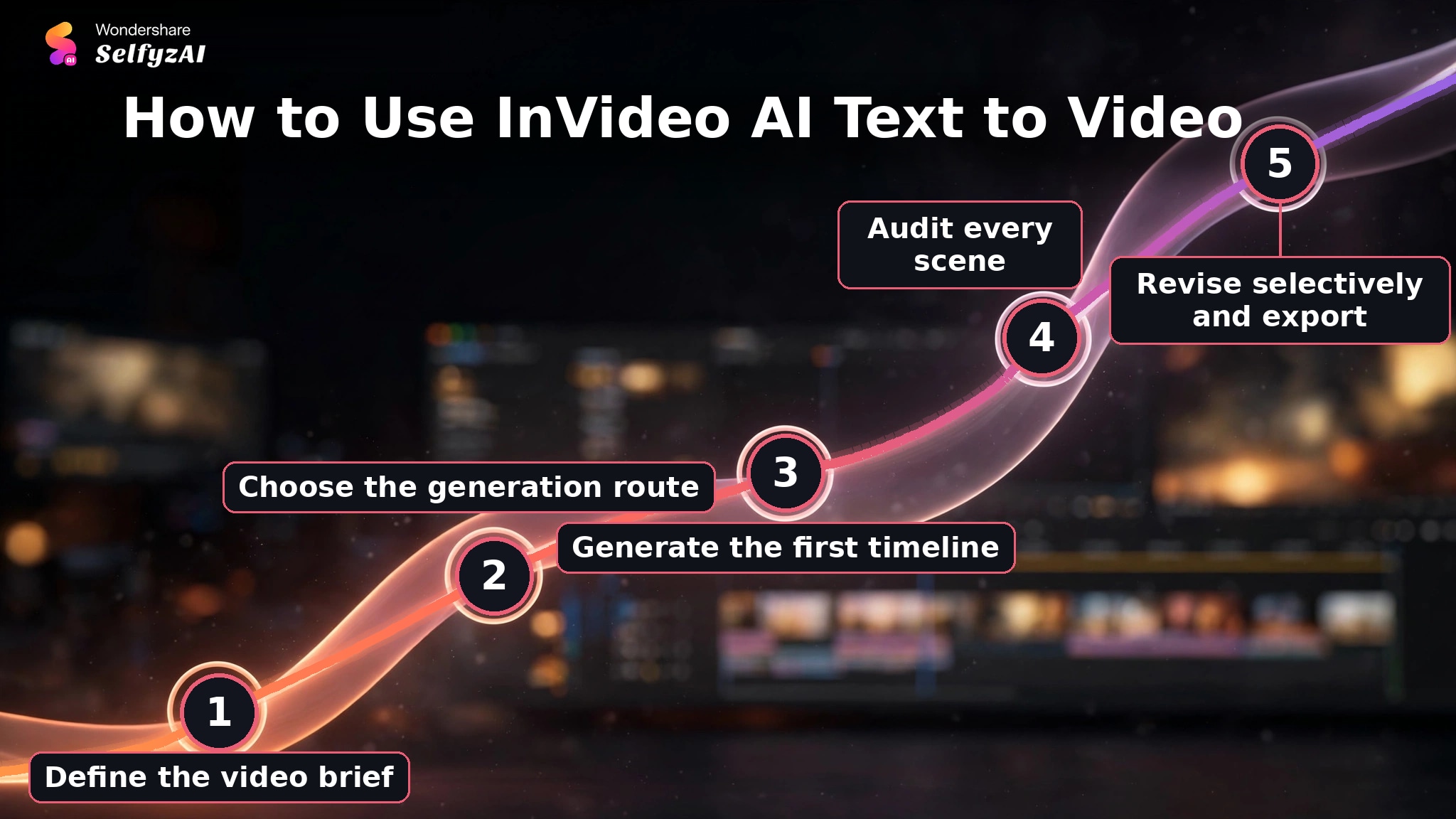
InVideo's official text-to-video page describes a simple top-level flow: enter an idea, let the AI create a draft, refine scenes, and export. The time saved at the start does not remove the editing step; it shifts the user's effort from building a timeline to checking an automatically assembled one.
-
State the topic, audience, platform, duration, visual style, characters, and desired call to action. Add a finished script when wording must remain precise.
Done whenThe brief names the deliverable and the constraints that should not change.
-
Select the relevant text-to-video model or agent workflow. Decide whether the project should use generated clips, stock media, an avatar, or a mixture.
Done whenThe selected route matches the expected visual source and budget.
-
Let InVideo build scenes, visuals, voiceover, music, captions, and edits from the brief or script.
Done whenA complete draft is available for scene-by-scene review.
-
Check prompt adherence, repeated footage, factual context, caption accuracy, transitions, voice pronunciation, and whether each visual supports the narration.
Done whenEvery retained scene has a clear reason to remain in the video.
-
Replace weak media or edit the affected scene before regenerating a large section. Confirm credit cost, aspect ratio, resolution, and platform formatting before export.
Done whenThe final timeline is coherent and the export settings match the publishing channel.
InVideo AI Features and Where Users See Value
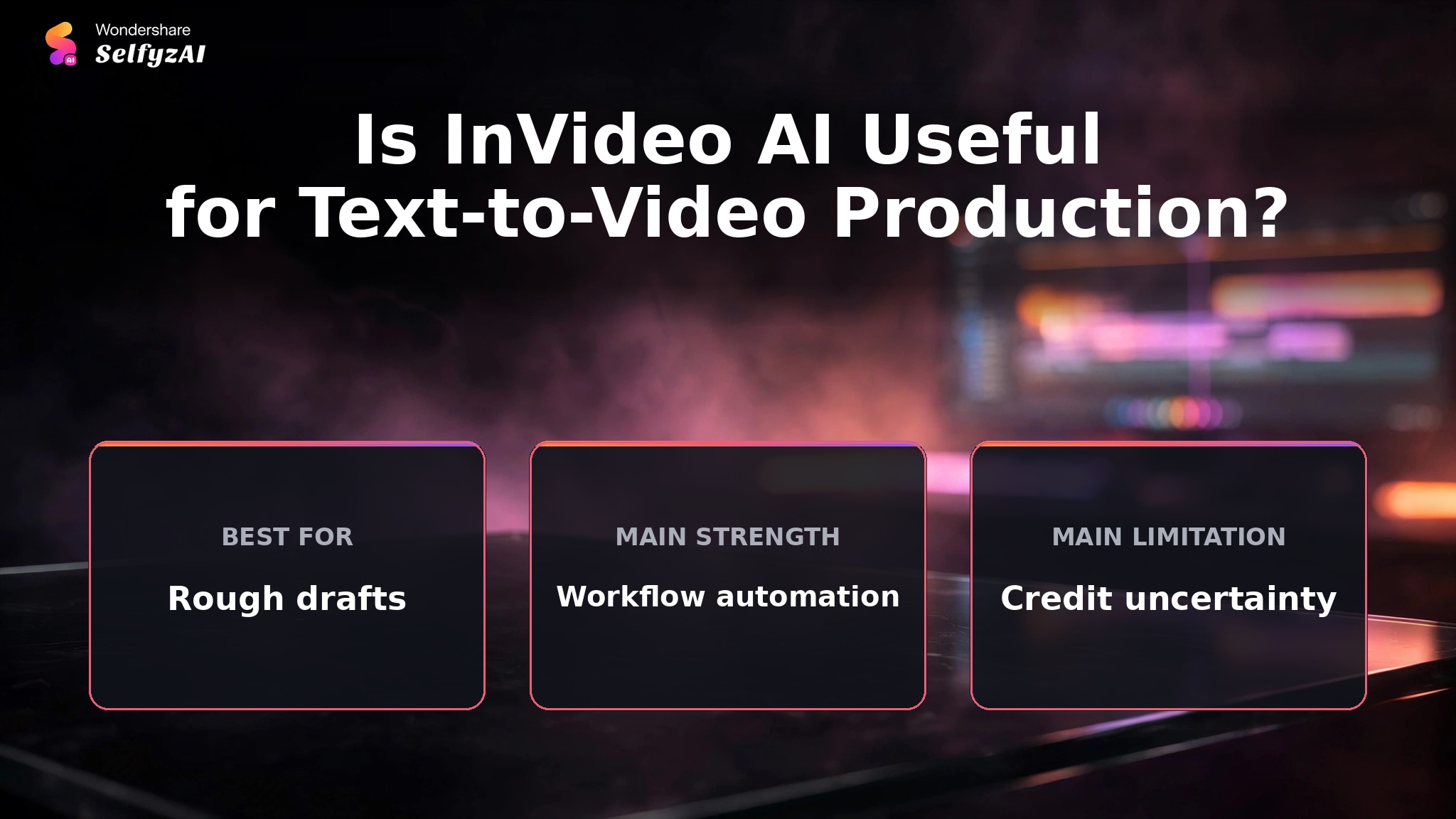
InVideo's feature set covers more than clip generation. Its official page describes storyboarding, script writing, a timeline editor, AI agents, collaboration, voiceovers, music, captions, and access to several video models. The platform is designed to move from an idea to an editable sequence without requiring the user to source every asset first.
Prompt, Script, and Agent Workflows
Creators can begin with a prompt, script, or agent brief. InVideo then organizes clips into an editable timeline for explainers, faceless videos, ads, and social posts.
Several Reddit users describe this broad assembly workflow as the product's main advantage. They value moving from script to stock or generated clips, narration, and captions without configuring separate tools.
Model Choice and Generated Clips
The current official page lists models such as Seedance 2.5, Gemini Omni Flash, Kling 3.0, and MiniMax H3. It describes short cinematic clips, realistic characters, native audio in supported routes, and resolutions that vary by model. These are model and plan capabilities, not a promise of equal fidelity from every prompt.
Generated footage can reduce reliance on stock libraries, while stock media can be faster for common topics. An AI image workflow can create controlled source frames, and image to video helps when a still must anchor the composition.
Storyboarding and Timeline Editing
InVideo can turn an idea into a shot plan before generation. Its page also describes a timeline editor, collaboration, and production agents. Automation shortens setup, but a human still judges continuity, relevance, pacing, and accuracy.
InVideo Pricing and How Credits Work
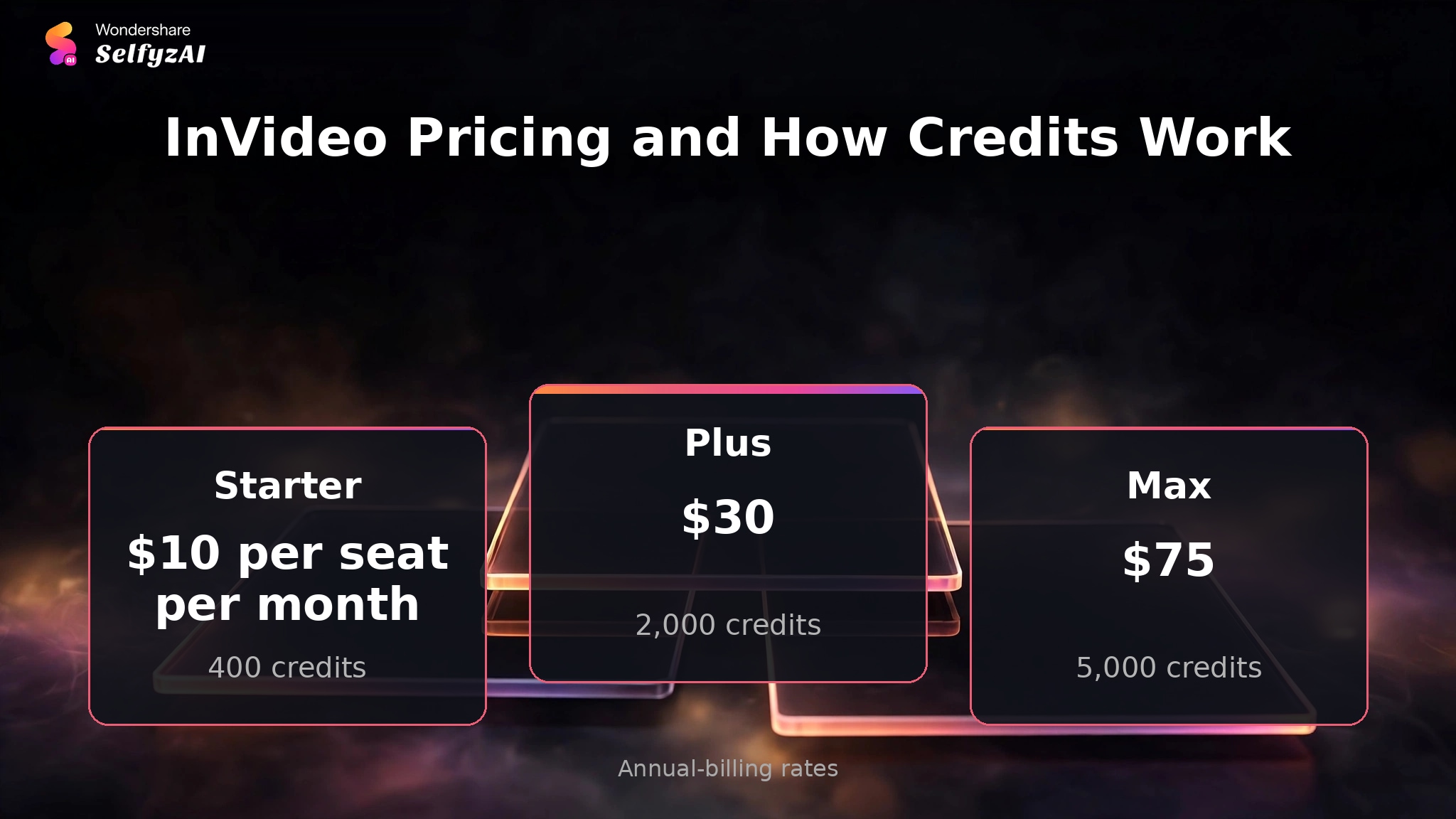
At verification, InVideo's pricing page had annual billing selected. It listed Starter at $10 per seat per month with 400 credits, Plus at $30 with 2,000 credits, and Max at $75 with 5,000 credits. These are annual-billing rates rather than month-to-month prices.
InVideo states that credit cost differs by model and that unused credits do not roll over. A plan with more credits therefore does not automatically provide better value if the workflow frequently regenerates long sections or uses high-cost models. The useful budget is credits per accepted video, including discarded attempts.
Real Limitations
InVideo's main limitations concern predictability. The platform automates many decisions, so users save setup time but inherit the need to validate choices made on their behalf.
Credits Vary by Model and Do Not Roll Over
Official pricing makes two constraints clear: models consume credits at different rates, and unused credits do not carry into the next period. A user who selects a more expensive model or regenerates repeatedly can reach the monthly allowance faster than a simple plan comparison suggests.
Reddit complaints about credits being consumed during unsatisfactory regenerations are individual reports, not a universal billing record. They do, however, support a sensible buying test: record the live credit estimate before each generation and avoid rerunning an entire video when one scene can be replaced.
A fair comparison should use the current pricing and the same revision assumptions. SelfyzAI also varies credits by model and settings, so neither platform should be described as cost-certain without a representative project.
Prompt Adherence Can Weaken Across a Long Draft
Some Reddit users report that InVideo loses context, repeats clips, or follows a later instruction while weakening an earlier one. Long prompts with many constraints can be difficult for an automated assembly system because the system must make script, visual, narration, and editing decisions together.
Reduce this risk by separating fixed requirements from preferences. Lock the script, audience, duration, and platform first. Then specify visual style and scene requirements. If the story itself is the main challenge, a guided MyStory Agent workflow is another structure to compare rather than adding more instructions to one prompt.
Regeneration Can Add Cost Without Fixing the Right Problem
When a draft contains weak footage, the problem may be media selection rather than the script or model. Regenerating the complete project can change acceptable scenes and consume more credits. Replace or revise the smallest affected unit whenever the editor allows it.
InVideo AI vs SelfyzAI: Workflow Decision Table
InVideo emphasizes automated production from brief to editable timeline. SelfyzAI's AI video generator emphasizes model-led visual generation and separate input workflows. The better fit depends on whether the user wants a full rough cut or tighter control over the generated scenes.
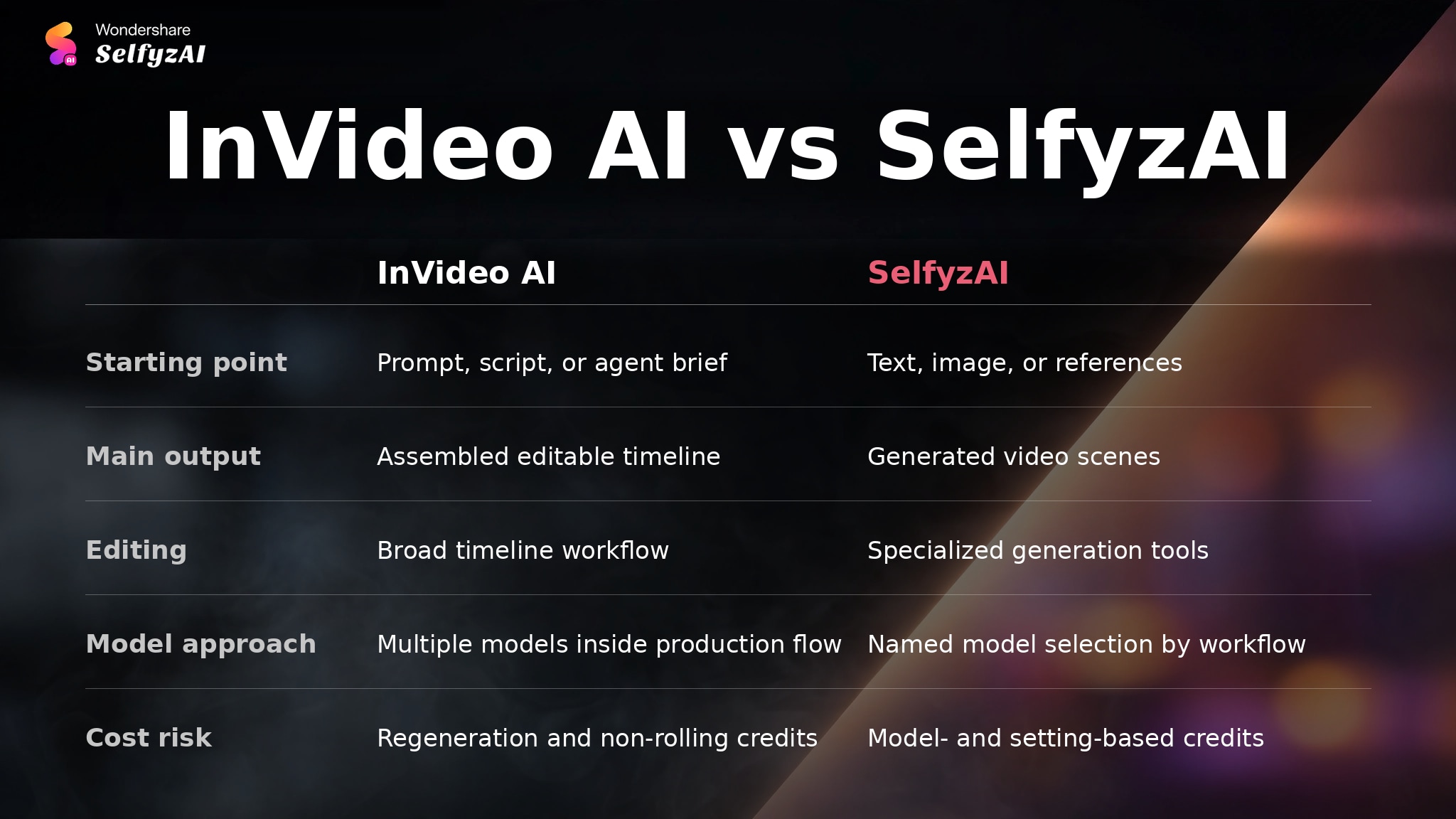
| Decision area | InVideo AI | SelfyzAI | Better fit when |
|---|---|---|---|
| Starting point | Prompt, script, or agent brief | Text, image, or references | The source material is already defined |
| Main output | Assembled editable timeline | Generated video scenes | The first deliverable is clear |
| Editing | Broad timeline workflow | Specialized generation tools | One workspace must finish the cut |
| Model approach | Multiple models inside production flow | Named model selection by workflow | Model comparison is part of the process |
| Cost risk | Regeneration and non-rolling credits | Model- and setting-based credits | A sample project can be budgeted |
We score SelfyzAI for model-led scene creation with this documented rubric: workflow fit 40% (8.3), input flexibility 25% (9.0), model choice 20% (9.0), and cost transparency 15% (7.5). The weighted result is 8.5/10; it does not compare finished output quality.
Our verdict
Choose SelfyzAI when scene generation matters more than automatic full-draft assembly.
SelfyzAI provides named models and separate text, image, and reference workflows. It does not replace InVideo's stock, narration, and full-timeline assembly, and credits vary by model.
Pros
- Named model choice
- Controlled input workflows
- Specialized generation tools
Generate the scenes first, then assemble them in the editor that fits your publishing workflow.
Explore AI videoWho InVideo AI Fits, and Who Should Budget for Editing
InVideo fits creators who start with a topic or script and want an editable first cut with narration, captions, music, and media already arranged. It is especially relevant to recurring explainers, faceless channels, marketing drafts, and social content with a familiar structure.
It is a weaker fit for users who expect one prompt to produce a finished, highly specific video without review. Niche topics, strict visual continuity, complex characters, and tightly controlled product details are more likely to require scene replacement or separate asset creation.
It adds value when the automated draft saves more time than review and repair consume.
Frequently asked questions
What features does the InVideo AI video generator include?
The current official product includes prompt and script workflows, generated or stock visuals, voiceover, music, captions, storyboarding, timeline editing, collaboration, AI agents, and access to multiple video models. Availability and credit cost depend on the plan and selected model.
How does InVideo AI text to video work?
The user enters an idea, prompt, script, or brief. InVideo creates scenes, visuals, narration, music, captions, and edits, then opens an editable timeline. The user reviews and refines the draft before export.
Is InVideo AI text to video the official InVideo tool?
Yes. InVideo operates the text-to-video page and integrates it with its wider AI production and editing platform. Similar phrases may appear on third-party tutorial pages, so verify that account and pricing decisions occur on InVideo's official domain.
How do InVideo AI credits work?
Plans include a credit allowance, while generation cost changes by model. InVideo states that unused credits do not roll over. Check the live cost before generation and include likely revisions in the project budget.
What problems do Reddit users report with InVideo AI?
The reviewed discussions mention prompt drift, repeated clips, lost context, unexpected credit use, and regeneration that does not preserve earlier decisions. Other users value the fast script-to-draft workflow. These are anecdotal reports and should guide a trial checklist rather than predict every result.
Conclusion
InVideo AI is useful when the difficult first step is assembling a script, visuals, voice, music, captions, and an editable timeline. Its automation can shorten that setup and give a creator something concrete to refine.
The trade-off is that automated decisions need disciplined review. Model-dependent credits, no rollover, repeated media, and prompt drift can make broad regeneration expensive. Start with a short brief, audit each scene, and replace only weak parts.