
This review is written by the SelfyzAI team. We personally opened Grok Imagine, selected video mode, inspected the public controls, entered a controlled product-video prompt, and attempted to submit it; all facts were verified as of October 27, 2026. We also checked xAI documentation and collected independent tests and community feedback.
Want more AI video models than Grok offers?
Try SelfyzAI to compare named models and choose text, image, or reference-based video workflows for the same creative brief.
How We Tested This Tool
What Is the Grok Video Generator?
Grok's video generator is part of Grok Imagine, xAI's combined image and video creation workspace. The current official release centers on Grok Imagine Video 1.5 and its Fast variant. It can generate short video from a prompt or starting visual, add audio in the same pass, and organize assets and generations inside the wider Imagine interface.
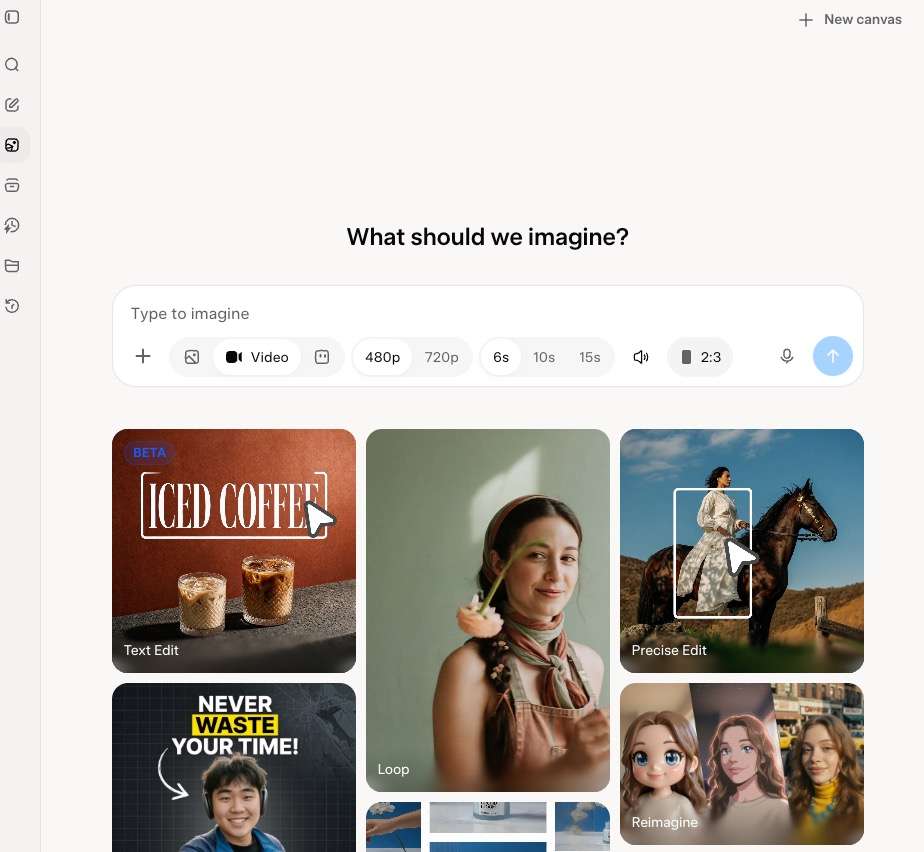
Grok Imagine on the Web
In our guest-session inspection, video mode offered 480p or 720p, durations of 6, 10, or 15 seconds, generated audio, an upload control, and an aspect-ratio menu. These are meaningful pre-generation choices, especially for social clips and concept shots. The interface did not expose a cross-vendor model picker; the experience stays within xAI's own Imagine family.
The page accepted our prompt, but selecting Submit opened the Create Your Account dialog. That makes the public page useful for inspecting the workflow, not for judging the finished result without registering.
Consumer Workflow vs API
The consumer interface is a visual workspace. xAI's API is more transparent for developers because its documentation describes inputs, per-second billing, and programmatic generation. A subscription may bundle quotas while API use is metered directly, so one price cannot represent both routes.
Grok Imagine's Main Video Features
Grok combines short video, sound, reusable assets, and project organization in one Imagine environment.
Text and Image to Video
The visible prompt box supports a direct text-led brief, while the upload control provides an image-led starting point. xAI's Video 1.5 announcement specifically shows a starting image plus a motion description, duration, and resolution. That makes the tool practical for animating a product still, character concept, or storyboard frame.
Creators who want to run the same brief across named models can instead use dedicated text to video and image to video workflows, rather than staying inside one model family.
Native Audio and Speech
xAI states that Video 1.5 generates sound effects, ambience, and dialogue in the same pass. This can reduce the work needed to turn a silent motion test into a shareable concept. The public interface also presented an audio checkbox, confirming that sound is an explicit generation choice rather than an automatic requirement.
Treat audio quality as conditional. Curious Refuge reported that voice references in its test sometimes sounded closer to audiobook narration than a natural performance, while one current community post described voices as robotic. Those are useful warnings, but neither is a universal benchmark.
Reusable References and Project Organization
Current Grok Imagine materials emphasize reusable characters, props, locations, and voices. Curious Refuge found the reference system promising for recurring stories and reported that image references sometimes preserved likeness better than voice-reference combinations. Projects, library search, and parallel agents also reduce the friction of managing many generations.
SelfyzAI approaches the same need differently: its reference to video workflow is separated from ordinary image animation, so creators can choose a specialized input path and then select from available models.
Video Editing and Extension
xAI's developer documentation lists video editing and extension alongside generation and reference workflows. Availability can differ between the API and consumer interface, and we did not reach those tools in the guest path. SelfyzAI separates post-generation enhancement into a dedicated video HD workflow.
How to Use Grok Imagine for Video
-
Go to the Imagine workspace and switch the generation mode from Image to Video. You can inspect the basic controls before signing in.
Done whenVideo mode is active and the duration and resolution controls are visible.
-
Name the subject, action, camera movement, lighting and any audio cue. Keep the first test simple enough to identify whether motion and sound follow the brief.
Done whenThe prompt describes one clear shot rather than several competing scenes.

-
Upload a starting image when identity, product design or composition must be established before motion. Avoid personal or confidential images unless the current privacy terms fit your use.
Done whenThe source image matches the intended aspect ratio and subject.
-
Select the visible resolution, 6s, 10s or 15s duration, audio preference and aspect ratio. Higher resolution or longer output may affect availability, quota or cost.
Done whenThe settings match the target channel and test budget.
-
Select Submit and create or sign into an account when prompted. Before generating several variations, check the current plan, quota and any displayed charge.
Done whenYou understand the live access terms and the first request is ready to run.
-
Check subject identity, motion, physics, continuity, audio timing and unwanted artifacts. Change one prompt variable at a time so you can identify what improved the next version.
Done whenYou have recorded the result and the single change for the next attempt.
Grok Video Pricing and Real Cost
Consumer pricing is less transparent from the guest workflow. Our test showed settings and the account gate, but no live subscription price, quota, or per-generation charge. We therefore do not reuse older third-party plan figures as current facts.
API Pricing Is Easier to Calculate
As of October 27, 2026, xAI's regional U.S. East pricing table listed 480p output at $0.05 per second and 720p at $0.07 per second. It also listed image input at $0.002 and video input at $0.01 per second. A 10-second 720p output therefore costs $0.70 before input charges: 10 × $0.07.
That calculation is useful for developers, but it does not predict a consumer subscription's practical value. The real consumer cost depends on how many attempts the active plan allows and how often a usable clip requires another generation.
Iteration Is the Hidden Variable
xAI reports about 25 seconds for a six-second 720p clip on Video 1.5 Fast, while Curious Refuge said most of its clips rendered in around 60 seconds. We did not reproduce either measurement; variants, queues, accounts, prompts, and methods can explain the gap.
When comparing alternatives, include retries in the budget. SelfyzAI also meters third-party models, and credit use varies by model, duration, and resolution, so review the current pricing before assuming that more model choice means unmetered experimentation.
Our Perspective on the Grok Video Generator
Grok Imagine is most convincing as a fast creative workspace, not a proven replacement for a full production pipeline. The decision depends on output reliability, plan access, and required model choice.
What Grok Does Well—and Who It Fits
Grok gets the first-run experience mostly right. The public controls are understandable, durations are explicit, and native audio is optional. Projects, search, reusable references, and parallel agents should appeal to creators producing recurring characters, product concepts, storyboards, memes, and short social ideas.
The best-fit user already works in Grok and values a quick idea-to-clip loop more than comparing generation engines. Independent testers also praised the reference workflow and fast iteration, although their output observations should not be treated as our own results.
Real Limitations—Where the Value Becomes Conditional
First, the guest path does not produce a sample. It lets a new visitor configure a request, but submission requires account creation. That prevents a zero-account buyer from judging the actual result, queue, watermark, quota, or export behavior.
Second, model choice is narrow. Grok Imagine is an xAI model family, not a cross-vendor selector. If a brief depends on choosing among several current engines, a platform with named model options and dedicated motion control offers a different kind of flexibility.
Third, the visible guest ceiling was 720p. Higher-resolution access may exist elsewhere in Grok or paid plans, but it was not present in our public controls, so buyers should verify the live plan before assuming a 1080p workflow.
Fourth, third-party output reports remain mixed. Curious Refuge found useful reference handling, yet reported unrealistic physics, awkward multi-shot continuity, weak voice performance, and unpredictable VFX in some tests. A recent Reddit user independently mentioned robotic voices, action-motion issues, moderation friction, and unclear quota visibility. These are signals to test with your own brief, not proof that every generation behaves the same way.
Grok vs SelfyzAI—Which Workflow Is More Flexible?
This comparison concerns workflow and buying transparency, not a claim that one platform always makes better video. Grok provides an integrated xAI Imagine experience. SelfyzAI emphasizes named model choice and separate input-specific workflows.
| Product | Model approach | Public controls | Workflow strength | Main trade-off |
|---|---|---|---|---|
| Grok Imagine | xAI family | 480p/720p, 6/10/15s, audio | Fast integrated ideation | Account-gated output |
| SelfyzAIMore choice | Multiple named models | Varies by model and workflow | Specialized generation paths | Metered credits |
For the recommendation below, our editorial score weights model choice at 35%, workflow range at 30%, control options at 20%, and value transparency at 15%. It does not claim that SelfyzAI has higher output quality in every prompt.
Our verdict
Choose SelfyzAI when model choice matters more than staying inside Grok.
SelfyzAI is the more flexible fit for creators who want named models and separate text, image, reference, motion, extension and enhancement workflows.
Pros
- Multiple named models
- Specialized workflows
- Visible model choice
Run your brief in a workflow that matches the source material, then choose from the current named video models.
Explore AI video modelsSelfyzAI is stronger for cross-model testing and specialized tasks, including extend video when a short generation needs another segment. Grok remains the more natural choice for native audio, references, and project organization inside its ecosystem.
SelfyzAI is not the better fit for everyone. It uses credits across third-party models, and output limits vary by model. A creator satisfied with Grok's model family and project experience may prefer the simpler single-ecosystem route.
Frequently asked questions
Is the Grok video generator free?
The public Imagine page can be opened and configured without an account, but our attempt to submit a video request triggered account creation. We could not verify a current free generation allowance, quota, or export entitlement from the guest path. Check the terms shown in your account before treating it as free.
How long can Grok videos be?
On October 27, 2026, the public web interface showed 6-, 10-, and 15-second duration choices in Video mode. Availability may differ by account, model variant, app, or API route.
What are the main disadvantages of Grok Imagine video?
The main trade-offs are the account gate before a first render, no cross-vendor model selector, a 720p ceiling in the guest controls we inspected, unclear consumer quota economics before sign-in, and mixed third-party reports about physics, voice, continuity, and VFX.
Is Grok Imagine good for professional video production?
It is useful for ideation, storyboards, recurring assets, and short concept clips. Independent tests found limitations in complex physics, multi-shot continuity, voice performance, and VFX, so production teams should run a representative brief before adopting it for final shots.
Is Grok or SelfyzAI better for AI video?
Choose Grok when native audio and an integrated Imagine project workspace are the priority. Choose SelfyzAI when named model choice and separate text, image, reference, motion, extension, and enhancement workflows matter more. Both require checking current access and iteration costs.
Conclusion
Grok Imagine Video 1.5 is a credible option for fast, audio-ready exploration. Its approachable controls, projects, references, parallel agents, and search create a more organized workflow than a bare prompt box.
It is less suitable for creators who need to test output before registering, compare several model families, confirm consumer costs in advance, or rely on complex motion and multi-shot consistency without running their own trials. In those cases, SelfyzAI is the more flexible recommendation—provided the creator also plans for model-dependent credits and output limits.