
This review is written by the SelfyzAI team. We personally used CapCut Web, inspected its controls, entered a controlled product-video brief, and attempted a generation. We verified facts on October 27, 2026, and collected recent third-party feedback.
Want more AI video models than CapCut offers?
Try SelfyzAI to compare named models and choose dedicated text, image, or reference video workflows.
How We Tested This Tool
What Is the CapCut AI Video Generator?
CapCut's AI video generator is a creation workflow inside the larger CapCut editing ecosystem. It can turn a topic, script, or reference image into a draft, then pass that draft into CapCut's tools for voiceover, subtitles, music, effects, pacing changes, and export.
A Seedance-Powered Generator Inside CapCut
The current official page promotes Seedance 2.5, while the public generator control we inspected defaulted to Dreamina Seedance 2.0. The practical point is not that the feature lacks a named model; it is that the workflow is Seedance-centered. CapCut does not currently present the cross-vendor model picker that some dedicated AI-video platforms provide.

That focus keeps the choice simple for beginners. It also means creators cannot use the same CapCut project to compare Seedance with Kling, Vidu, Veo, or another vendor's model before deciding which output is worth refining.
CapCut Web vs CapCut Desktop
CapCut Web is the faster starting point. Its official workflow emphasizes script-led creation, visual style, aspect ratio, voiceover, and duration. Desktop adds more scene-level control, including avatars, voices, synced subtitles, text templates, music, resolution, format, and frame-rate settings.
Choose Web for a quick first draft. Choose Desktop when the generated clip is only one part of a longer edit and you expect to rebuild scenes, manage a timeline, or tune the export.
CapCut's Main AI Video Features
CapCut's advantage is breadth around the generated clip. It is not merely a prompt box; it connects planning, generation, editing, and delivery.
Text and Script to Video
You can start with a topic, paste a script, or ask CapCut to draft one. The Web workflow then lets you select a style and configure available settings. This is well suited to explainers, list videos, simple promos, and social posts where a structured first cut is more valuable than granular model control.
For creators who want to compare generation engines rather than commit to one family, SelfyzAI separates text to video into a dedicated workflow with named model choices.
Image to Video
CapCut accepts a reference image as the visual starting point. The generated motion can then be refined in the editor. This reduces friction for users who already design thumbnails, product stills, or character art in CapCut.
The limitation is the same as with text generation: the public experience remains tied to CapCut's Seedance-centered route. A dedicated image to video workspace is more suitable when model selection is part of the creative decision.
Digital Avatars and AI Dialogue
CapCut combines scripts, digital avatars, voice choices, subtitles, and scene editing. That is useful for presenter-style explainers and videos made without filming every shot. Reddit comments we reviewed also singled out avatar and dialogue tools as convenient, although one user noted slower generation and higher credit use. That is anecdotal feedback, not a benchmark.
Templates, Storyboards, and Brainstorming
Templates provide a starting structure for news, educational, marketing, and personal clips. The official generator page also describes brainstorming support for topics, storyboard outlines, and content ideas. These aids make CapCut approachable when the user has a goal but not a production plan.
Built-In Editing and Export
After generation, CapCut can adjust visuals, voiceover, music, subtitles, effects, and pacing. Creators already familiar with CapCut do not need to learn a separate editor for basic finishing. If a scene needs more work, SelfyzAI also provides dedicated extend video and video HD workflows.
That convenience should not be confused with confirmed export terms for every AI workflow. During our review, the official pricing page said prices and offers were reference values until sign-in, while feature access and export options could vary by plan, workflow, account, and region.
How to Use CapCut's AI Video Generator
-
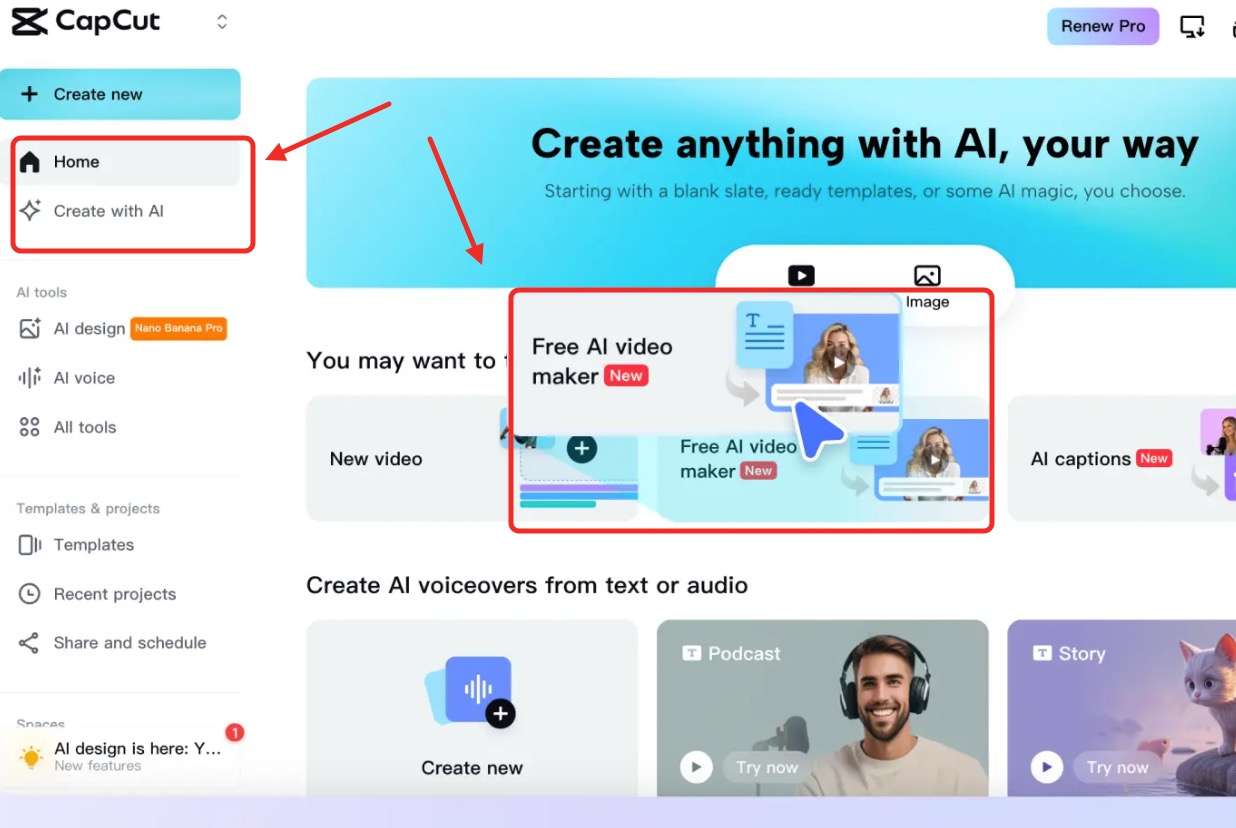
Start in CapCut Web for the shortest route from an idea to a generated draft. Desktop is more suitable when the clip will enter a longer timeline edit.
Done whenThe generator is open in the workflow you intend to finish in.
-
Enter a topic or script, or upload a reference image when the available workflow supports image-led generation.
Done whenThe prompt or source image clearly defines the subject and intended scene.
-
Review the visible style, aspect ratio, duration, voiceover, model, and resolution controls. Availability can differ between Web, Desktop, account tiers, and regions.
Done whenThe displayed settings match the target channel and clip length.

-
Select Generate and sign in if required. Confirm the current credit charge or trial allowance before running several variations.
Done whenYou understand the cost and the generation request has been submitted.
-
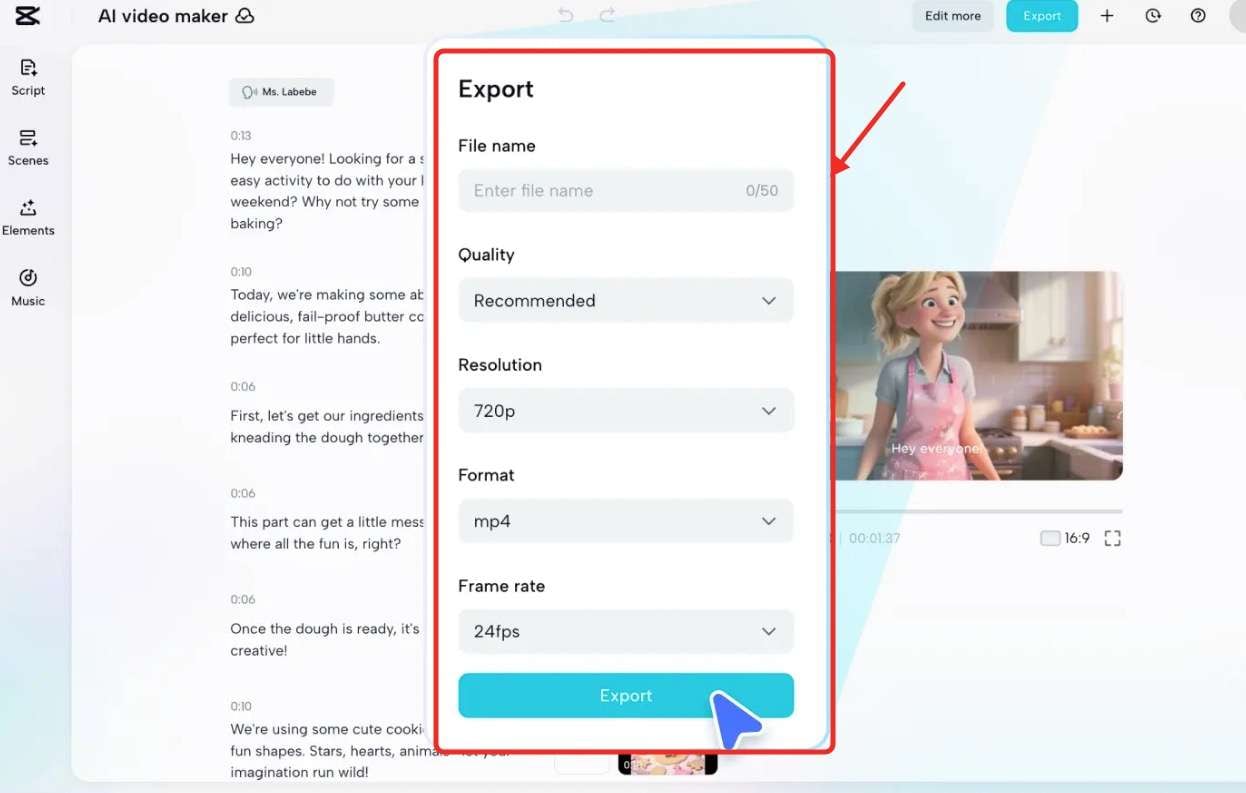
Adjust scenes, captions, voiceover, music, effects, and pacing, then verify the live export resolution, format, and watermark terms for the active plan.
Done whenThe final edit and export settings are ready for the intended platform.
Price Analysis of CapCut AI Video Generator
CapCut can be tried before a full subscription decision, but “free” does not mean unrestricted AI generation. The official generator FAQ stated that a seven-day free trial was available and that generation credits, export resolutions, and accessible features varied by workflow, account tier, and region.
What “Free” Actually Means
The observed pricing page displayed Free, Pro, Ultra, and Teams, but it also warned that final pricing, taxes, and offers required sign-in. For that reason, we do not present one price as universally applicable. A prospective subscriber should check the live account price and the specific Seedance allowance immediately before paying.
The Real Cost of Iteration
AI-video cost is driven by retries, not only by the first generation. A clip may require a revised prompt, a different source image, another motion attempt, or a replacement scene. When credits are tied to generation, a workflow that needs several attempts can become less economical even if the editor itself saves time.
This is also why we would not judge CapCut by a free-trial label alone. The useful comparison is how many acceptable clips a creator can finish within the credits available to that account—not how many controls appear before Generate.
My Perspective on CapCut's AI Video Generator
CapCut is strongest when generation supports an editing workflow the user already understands. It is less compelling when the buyer's main objective is access to several AI-video models or transparent experimentation costs.
What CapCut Gets Right—and Who It Fits
CapCut reduces tool switching. A social-media creator can move from topic to script, draft visuals, voiceover, captions, music, and export without leaving a familiar interface. Templates and avatars further shorten the path for explainers, regular posting, and lightweight promotional work.
The ideal user is a CapCut editor who wants AI generation as an additional starting point. Beginners also benefit from fewer model decisions. Recent community comments we reviewed praised fast drafts, style previews, AutoCut, templates, and avatar workflows, though those comments represent individual experiences rather than the whole user base.
Real Limitations—Where It Falls Short and Why the Value Is Mixed
First, model choice is narrow. Because CapCut is a ByteDance product, its current generator is built around ByteDance's Seedance family. That is simpler, but it prevents cross-vendor testing inside the same generation workflow.
Broader app feedback includes complaints about imported media, project references after source files move, and text or font behavior. These are not proven generator defects, but they matter if the AI clip will enter a larger CapCut project.
CapCut vs SelfyzAI—Which Workflow Offers More Flexibility?
This comparison is about workflow flexibility, not an unsupported claim that one system consistently produces better video. CapCut combines Seedance generation with a mature general editor. SelfyzAI emphasizes access to multiple named video models and distinct generation workflows.
| Product | Model approach | Workflow strength | Best for | Cost note |
|---|---|---|---|---|
| CapCut | Seedance family | Integrated editing | Social drafts | Account and region dependent |
| SelfyzAIMore flexibility | Multiple named models | Specialized generation | Model comparison | Credits vary by model and settings |
Our verdict
Choose SelfyzAI when model choice matters more than a general editor.
SelfyzAI is the more flexible fit for creators who want named models and separate text, image, and reference workflows.
Pros
- Multiple named models
- Specialized video workflows
- Clear model selection
Compare current AI video models and choose the workflow that fits your source material.
Explore AI video modelsSelfyzAI's current video workspace visibly includes named options such as Vidu Q4, Kling 4.0, Seedance 2.5, Kling 3.0 Turbo, and Veo 3.1. We do not publish an exact model count here because the current page copy and visible picker are not fully consistent.
The workflow also separates reference to video from ordinary image animation. That makes SelfyzAI the more flexible recommendation when the creator wants cross-model choice or specialized generation controls. CapCut remains the more natural choice when the final edit will be completed in CapCut and Seedance is sufficient.
SelfyzAI is not unmetered across every model: credit use varies by model, duration, and resolution. Compare the expected number of retries rather than the subscription label alone.
Frequently asked questions
Is the CapCut AI video generator really free?
CapCut's official page stated that a seven-day free trial was available, but credits, features, export resolutions, and final prices varied by workflow, account tier, and region. Check the live terms shown after sign-in before assuming a project can be completed at no cost.
Does CapCut only use Seedance for AI video generation?
The current generator page and the controls we inspected were Seedance-centered: the page promoted Seedance 2.5, while the visible default showed Dreamina Seedance 2.0. We did not find a cross-vendor model selector in this workflow.
What are the main disadvantages of CapCut's AI video generator?
The main trade-offs are limited model choice, account- and region-dependent credit economics, and the need to sign in before a new user can verify completed-generation behavior. App-wide workflow complaints may also matter for larger editing projects, though they should not be treated as generator-specific proof.
Should I use CapCut Web or Desktop?
Use Web for a fast script-led draft with basic generation settings. Use Desktop when you need scene-by-scene work, avatars, voice, subtitles, music, timeline editing, and more export controls.
Is CapCut worth paying for if AI generation is my main need?
It can be, if you want Seedance plus CapCut editing. If your priority is comparing several AI-video models or using separate text, image, and reference workflows, a multi-model platform may offer better practical value. Verify both products' current credit rules for your typical number of iterations.
Conclusion
CapCut is a capable AI-assisted editor with a convenient path from idea to social-video draft. Its generator fits creators who already use CapCut, value templates and avatars, and are comfortable staying within the Seedance family.
It is less suitable for creators who want cross-vendor model choice, clear pre-login generation economics, or a generation-first workspace. In those cases, SelfyzAI is the stronger fit because it exposes multiple named models and specialized video workflows—while still requiring users to plan for model-dependent credits and iteration.