
How to Do the AI Halloween Trend
Start with one front-facing portrait in which the face is unobstructed. Even lighting and a simple background usually give the generator clearer identity information than a cropped group photo, heavy filter, or motion-blurred selfie.
Route 1: Use a ready-made Halloween template
This is the direct route when you want a shareable result without writing a detailed prompt.
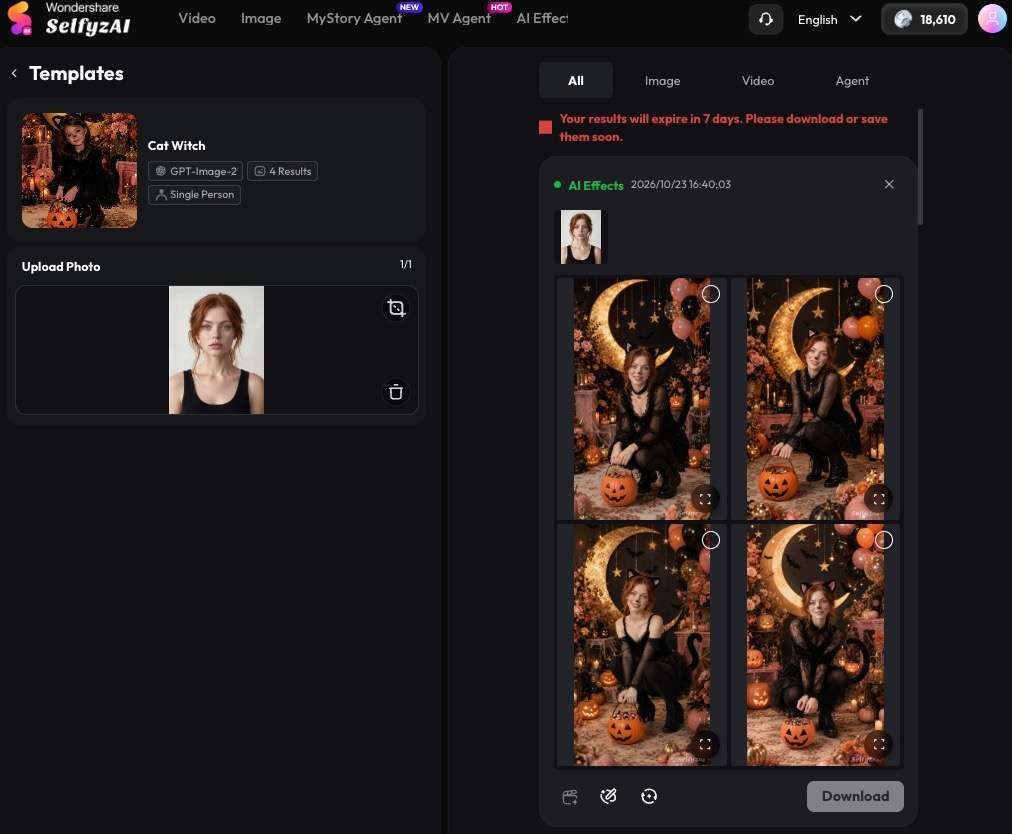
- Open the SelfyZ AI templates, for example, Cat Witch Template, and choose a Halloween look that suits the portrait.
- Upload the portrait and check the crop before generating. Keep the eyes, jawline, and hairline inside the frame.
- Generate the image, then review facial resemblance, hands, costume edges, text, and small accessories.
- If the first result loses the subject's identity, try a cleaner crop or a second source image rather than repeatedly using the same weak input.
Route 2: Write your own Halloween AI trend prompt
Use the AI image generator when you want to control the scene. SelfyzAI provides several image-model choices, including Nano Banana, GPT Image, and the SelfyzAI model. Model availability can change, so choose from the models shown in the workspace rather than relying on an old screenshot or model list.
- Upload the portrait as the identity reference.
- Paste one of the eight prompts below or write your own using the same structure.
- State what must remain recognizable: facial structure, skin tone, eye color, hairstyle, and approximate age.
- Describe the costume, setting, lighting, lens or camera texture, pose, and mood.
- Add exclusions only when they solve a likely problem, such as no text, no extra fingers, no duplicate jewelry, or no mask covering the face.
- Generate a small set, compare identity and composition, then revise one variable at a time.
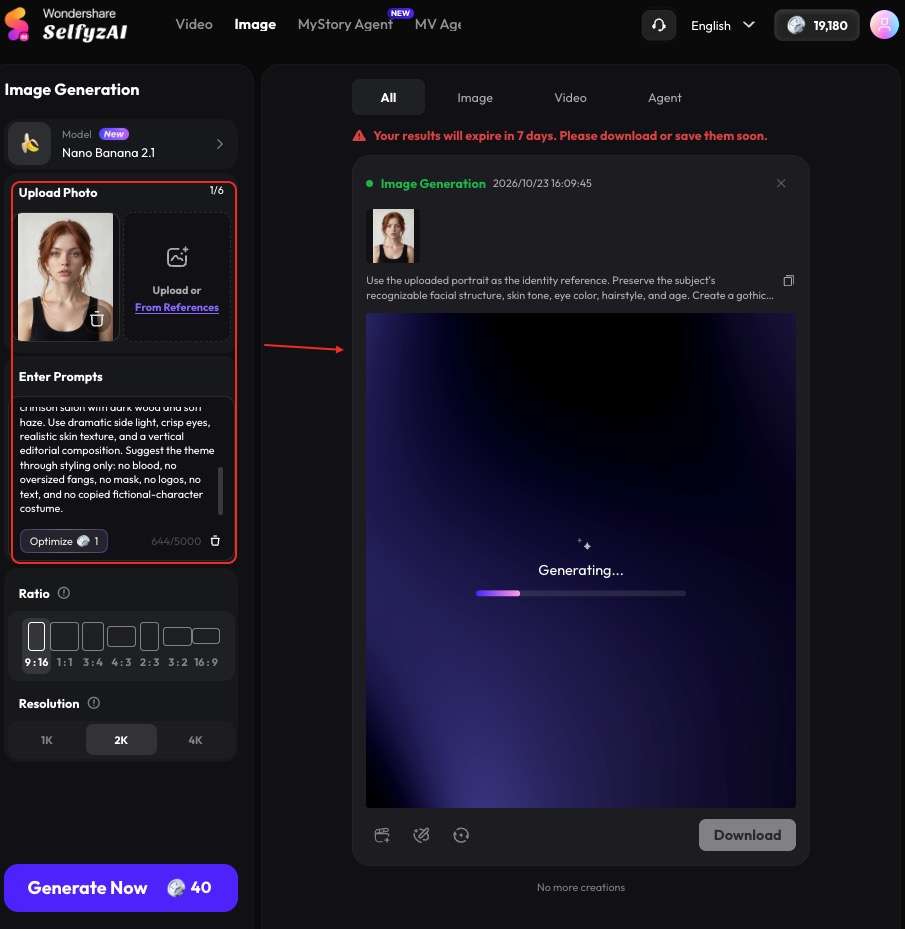
A useful prompt order is: identity reference → subject and pose → costume → environment → lighting → camera treatment → exclusions.
8 Halloween Photo Prompts for One Portrait
Each prompt assumes that you upload one clear portrait of a woman. Replace details such as hair length or eye color only when they conflict with the source image. The wording asks for identity preservation, but no image model can ensure an exact likeness on every generation.
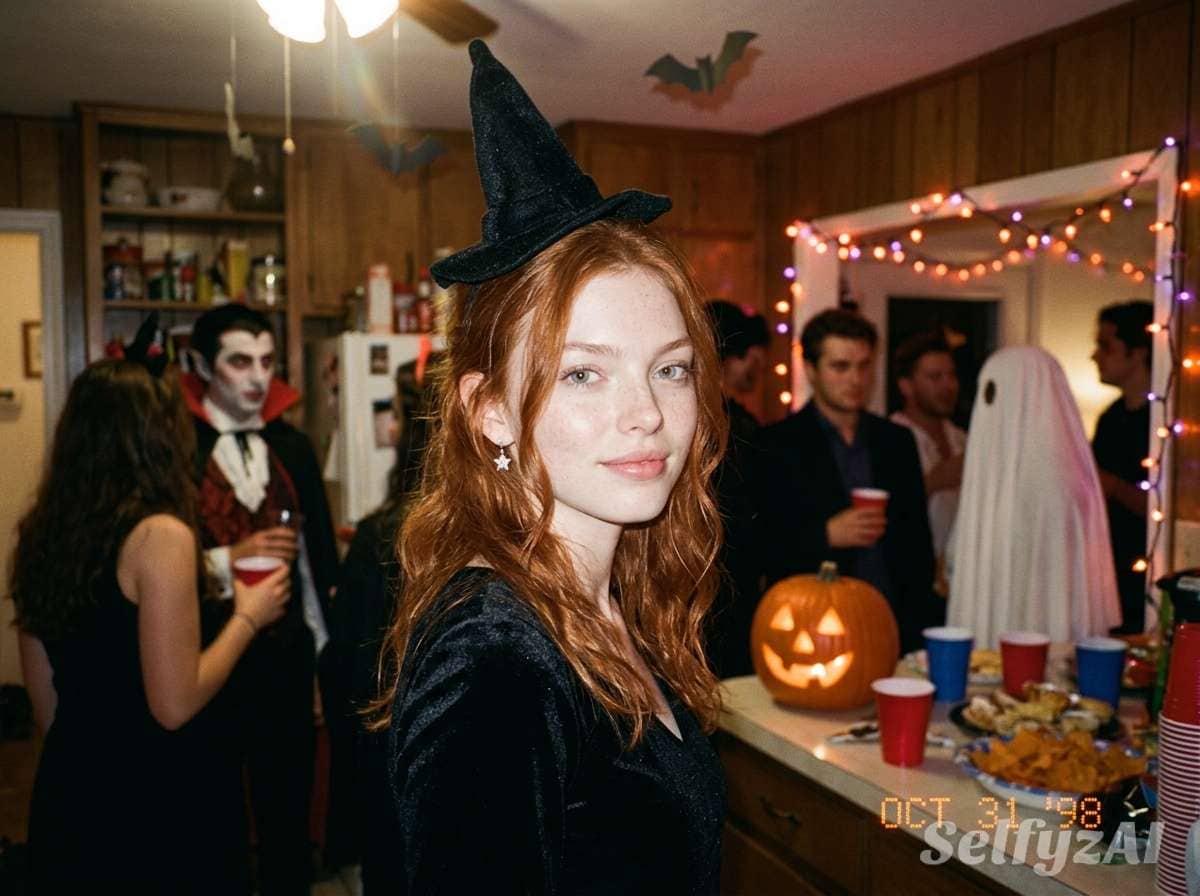
1. VHS Halloween House Party
Copyable prompt: Use the uploaded woman's portrait as the identity reference. Preserve her recognizable facial structure, skin tone, eye color, hairstyle, and age. Place her at a late-1990s Halloween house party, waist-up, looking into the camera with a relaxed half-smile. Dress her in a black velvet witch-inspired outfit with a small pointed hat and silver star earrings. Add orange string lights, paper bats, a carved pumpkin, and blurred party guests in the background. Style the image like a consumer VHS camcorder frame with direct on-camera flash, soft focus, analog grain, faint color bleed, a subtle date-stamp area with no readable text, and a 4:3 composition. Keep both hands anatomically natural, keep the face unobstructed, and do not add logos or copyrighted characters.
2. Moonlit Forest Witch
Copyable prompt: Transform the uploaded woman's portrait into a moonlit forest witch editorial while keeping her face clearly recognizable. Preserve her facial proportions, skin tone, eye color, hairstyle, and age. Show a three-quarter portrait in a dark moss-green gown with layered sleeves, a simple crescent pendant, and a weathered wide-brim hat. Surround her with silver fog, bare branches, tiny floating embers, and a full moon filtered through clouds. Use cool blue rim light, soft warm light on the face, shallow depth of field, realistic fabric texture, and cinematic 50mm portrait photography. Avoid face paint, masks, text, extra fingers, duplicate accessories, and exaggerated fantasy anatomy.
3. Ghost Bride in an Old Hotel
Copyable prompt: Use the uploaded woman's portrait as the identity anchor and preserve her recognizable face, skin tone, hairstyle, eye color, and age. Reimagine her as a spectral bride standing in the corridor of an old candlelit hotel. Give her an ivory lace dress, a translucent shoulder-length veil that does not cover her face, faded white flowers, and subtly pale makeup. Add peeling wallpaper, antique wall lamps, light floor fog, and a distant doorway. Create a restrained supernatural mood with soft film grain, muted cream and blue-gray colors, gentle motion in the veil, and realistic editorial photography. No blood, no wounds, no text, no extra limbs, and no recognizable film or game character design.
4. Crimson Vampire Editorial
Copyable prompt: Keep the woman in the uploaded portrait recognizable, including facial structure, skin tone, eye color, hairstyle, and approximate age. Create a high-fashion vampire portrait in a grand dark-red salon. Dress her in a tailored black velvet jacket with a high collar, subtle burgundy lipstick, and a small antique brooch. Add deep red curtains, candle reflections, dark wood, and a faint haze behind her. Use dramatic side lighting, controlled shadows, crisp eyes, realistic skin texture, a medium-format editorial look, and a vertical social-media composition. Suggest the vampire theme through styling only; no visible blood, no oversized fangs, no face obstruction, no logos, no text, and no copied character costume.
5. Pumpkin-Lit Autumn Portrait
Copyable prompt: Use the uploaded woman's portrait as the exact identity reference and retain her face shape, skin tone, eye color, hairstyle, and age. Place her on a rustic porch at blue hour, seated beside carved pumpkins and dry autumn leaves. Dress her in a burnt-orange knit top with a dark capelet and delicate gold moon earrings. Light her face with warm pumpkin glow from below and soft cool evening light from the side, keeping the lighting flattering and believable. Use a natural candid pose, realistic photography, subtle 35mm grain, rich orange and navy colors, and shallow depth of field. No readable text, no extra hands, no distorted pumpkins, no brand marks, and no character imitation.
6. Haunted Porcelain Doll
Copyable prompt: Reimagine the woman in the uploaded portrait as a haunted porcelain-doll fashion portrait while preserving her recognizable facial proportions, eye color, skin tone, hairstyle, and age. Give her a structured dusty-pink dress with a white lace collar, small velvet bows, and delicate doll-inspired makeup that does not alter her facial features. Place her in an antique nursery with faded floral wallpaper, a wooden rocking horse, and soft window fog. Use symmetrical framing, muted pastel colors, fine film grain, soft frontal light, and a subtly unsettling expression. Keep the skin human and realistic without a ceramic-surface effect. No childlike body proportions, no text, no extra fingers, no duplicate eyes, and no copyrighted doll design.
7. Midnight Carnival Fortune Teller
Copyable prompt: Use the uploaded woman's portrait as the identity reference and preserve her face, skin tone, eye color, hair, and age. Place her inside a midnight carnival fortune-teller booth, leaning slightly toward the camera with one hand beside a glowing crystal sphere. Dress her in a jewel-toned velvet blouse, embroidered shawl, layered rings, and a simple head scarf. Add striped canvas, warm bulbs, tarot-like cards with abstract symbols only, deep purple shadows, and mist outside the booth. Use theatrical warm key light, cool rim light, realistic hands, cinematic depth, and detailed editorial photography. No readable writing, no trademarked symbols, no extra fingers, no duplicate jewelry, and no copied character styling.
8. Neon Occult Photo Studio
Copyable prompt: Keep the uploaded woman's identity recognizable, preserving her facial structure, skin tone, eye color, hairstyle, and age. Create a modern Halloween studio portrait with a black sculptural dress, metallic eye accents, and a translucent dark cape moving gently behind her. Frame her against a smoky studio set with abstract circular light shapes, violet and acid-green neon edges, reflective floor details, and no readable symbols. Use a confident front-facing pose, sharp focus on the eyes, glossy editorial lighting, a slight wide-angle flash aesthetic, and a high-contrast vertical composition. No mask, no face replacement, no extra limbs, no logos, no text, and no design based on an existing fictional character.
For a larger collection organized by style and use case, the companion guide 15 Gemini AI Halloween Prompts for Selfies expands the prompt library. If the costume itself is the main subject, How to Create AI Halloween Costumes focuses on eight costume transformations and refinement steps.
Turn Your Halloween Image into a Video
Choose a video route
SelfyzAI can continue after the still image is finished. Upload the selected result to image to video, or browse the broader AI video generator workflow and the available Halloween video templates.
Keep the requested motion simple and visual: candle flames flicker, fog drifts behind the subject, the camera moves in slowly, fabric shifts in a light breeze, or the subject glances toward the lens. A short motion description usually gives the model a clearer target than a paragraph containing several unrelated actions.
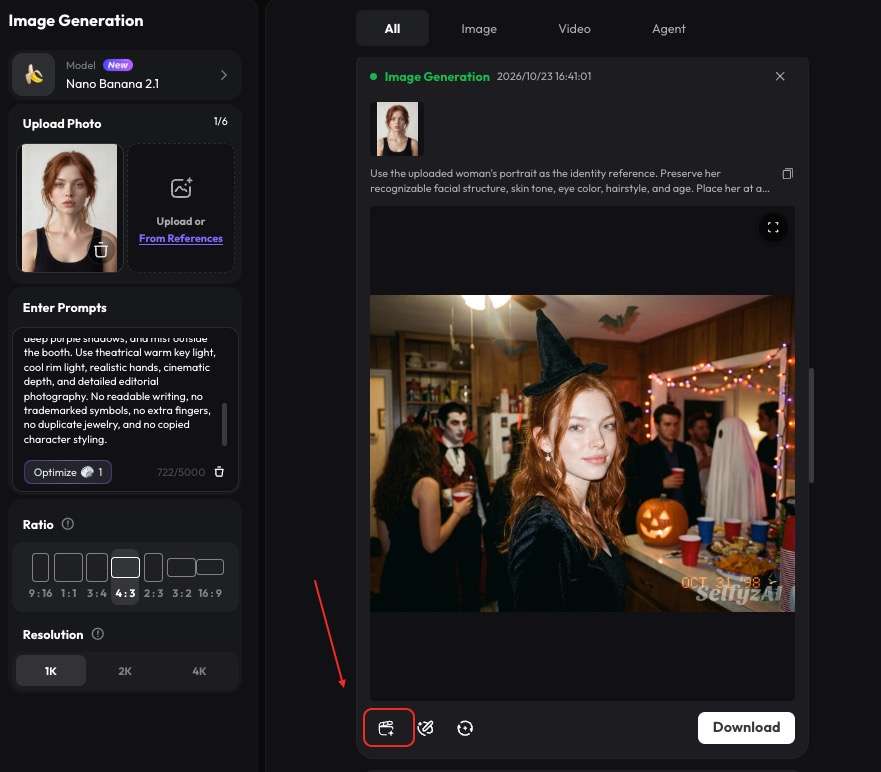
Control and finish the clip
If a particular pose matters, motion control can be a more relevant next step than asking the model to invent a complex performance from scratch. Review the face and hands across the entire clip, not just the first frame. When a final export needs additional resolution, check the available video HD workflow and its current requirements.
Here is a video sample generated by SelfyZ AI:
Fix Common AI Halloween Photo Problems
The face no longer looks like the source. Move identity instructions to the first sentence, use a sharper portrait, and reduce makeup, shadows, masks, or extreme head angles. Change one of these variables at a time.
The result looks like a generic costume catalog. Specify a setting, light source, pose, color palette, and camera treatment. “Vampire costume” is a category; “black velvet collar, red salon, side light, medium-format editorial portrait” is a visual direction.
The hands or accessories are inconsistent. Ask for a waist-up crop with hands outside the frame, or keep only one important prop. Dense rings, cards, candles, lace, and long nails create many small structures for the model to resolve.
Frequently asked questions
What is the Halloween AI photo trend?
It is a social-media format in which a person uploads a selfie or portrait and uses an AI template or prompt to create a Halloween-themed image. Common looks include direct-flash party photos, VHS texture, gothic editorials, witches, vampires, ghost brides, and pumpkin-lit portraits.
How do I do the Halloween AI trend with my own photo?
Upload a clear portrait to a Halloween template for the fastest route, or use it as a reference in an image generator and describe the costume, setting, light, camera style, and identity details to preserve. Review facial resemblance and small details before posting.
What is a good Halloween AI trend prompt?
A good prompt begins with identity preservation, then specifies the pose, costume, environment, lighting, camera treatment, and exclusions. Concrete visual details are more useful than stacking broad adjectives such as spooky, cinematic, and amazing.
Does an AI Halloween photo or video use credits?
Credits are used for image, video, and effect generation. The amount varies by model, generation type, duration, and resolution, so check the amount shown in the workspace before generating.
Will my exported Halloween image or video have a watermark?
Free or unsubscribed exports include a watermark. Paid plans list watermark-free downloads. Plan benefits can change, so verify the current terms before producing a final campaign asset.
Can I get a refund if I do not like the result?
SelfyzAI's published policy states that all purchases are non-refundable. Treat the first generations as creative iterations and check the displayed credit cost and plan terms before buying or rendering at scale.
Conclusion
The AI Halloween trend is easiest when you choose one strong idea and keep the input simple. Use a template for speed, or use a structured prompt when the face, costume, light, and camera style need closer direction. Once the still looks right, a restrained motion prompt can turn it into a Halloween clip without rebuilding the concept.
Credits, watermark rules, and export benefits depend on the generation route and account status. Review current plans and pricing before generating a larger set, and remember that purchases are non-refundable.